What auto top-up is
Auto top-up keeps your FlowSpace credit balance topped up automatically, so your team never hits a wall at checkout. You set two numbers — how many credits to buy, and the balance that triggers the purchase — and we handle the rest.
It replaces the old monthly subscription plans. You pay for what your team actually books, rather than a fixed fee whether you use it or not.
Why it's worth setting up
The headline reason is price. On an auto top-up plan credits are £2.50+VAT each — 10% off the £2.75 pay-as-you-go rate. That's £250 saved on every 1,000 credits you buy.
The rest is admin you stop doing:
- No one has to buy credits before every booking
- Nobody gets blocked mid-checkout because the balance ran dry
- One payment method on file, centralised for the whole team
- Spend caps and usage analytics so you stay in control
- Cancel anytime
Where to find it
You need an admin account on your company's FlowSpace profile. If you can't see Manage company, ask whoever set up your account to make you an admin — or give us a shout and we'll do it.
- Click on profile
- Manage company
- Credits
- Switch to Auto top up
Setting it up
- Log in and open Manage company.
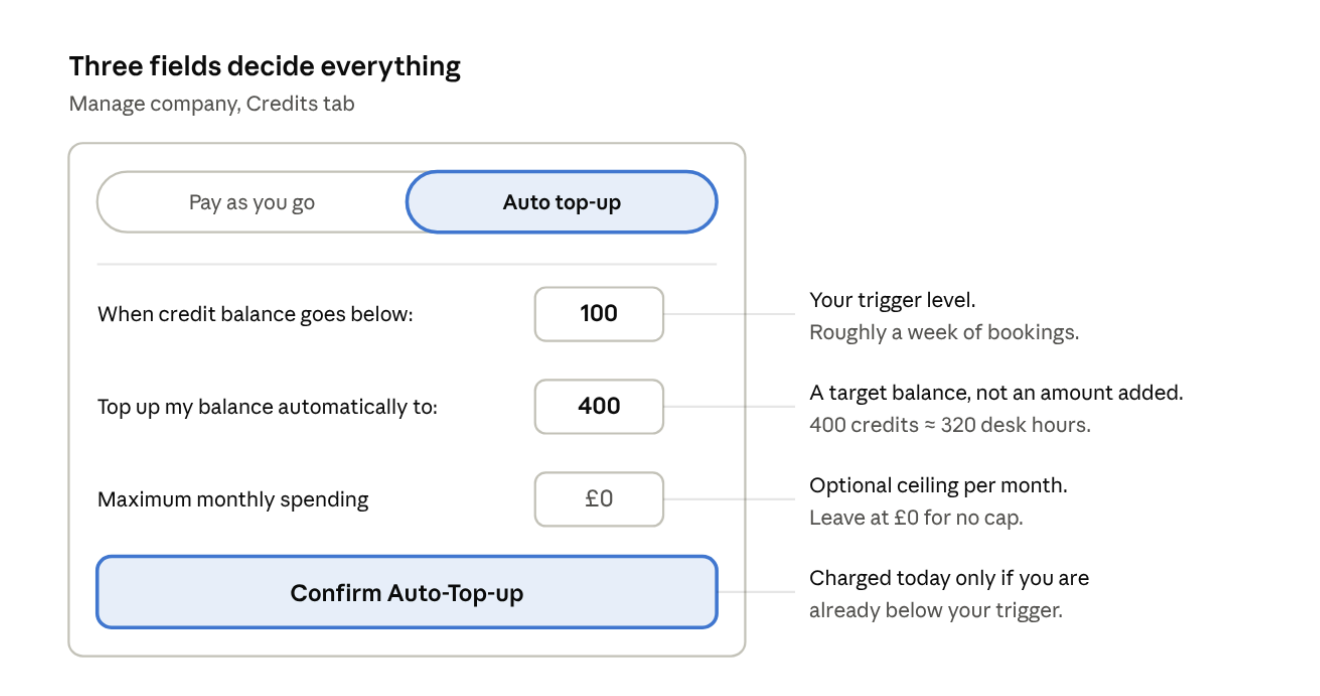
- Go to the Credits tab and switch the toggle from Pay as you go to Auto top-up.
- When credit balance goes below — the level that triggers a top-up (e.g. 100 credits).
- Top up my balance automatically to — the balance we bring you back up to (e.g. 400 credits). This is a target balance, not an amount added. The page shows what that buys you in booking hours as you type.
- Maximum monthly spending — an optional ceiling on what we can charge in a month.Leave it at £0 if you don't need a cap. Check the summary, then confirm and add your card.
- What happens at that last step depends on your balance:
- Balance already below your trigger — the first top-up runs immediately.
- The summary shows exactly what you'll pay, e.g. 400 credits × £2.50 = £1,000 + £200 VAT = £1,200 today. The button says Pay £1,200 & activate.
- Balance still above your trigger — we store the card and charge nothing now. You'll see "We'll take card details to auto top-up, but we won't charge you now."
- Your live balance shows as Company credits in the top right of every page.
If you'd rather pay by invoice than by card, tell us and we'll set that up instead — auto top-up still works the same way.
Choosing your numbers
Two rules of thumb:
- Top up to: roughly one to two months of bookings. Credits are valid for 2 months, so there's no point stockpiling a year's worth.
- Trigger level: about a week of bookings. High enough that the top-up lands before anyone is blocked.
Once it's running
- When your balance falls below the trigger, we charge the card on file for whatever it takes to bring you back up to your target balance, plus VAT at 20%. The credits land immediately and you get an emailed receipt each time.
- Your current balance and plan status sit in the credits area of your account — that's where you check what's left and what you last paid.
- To change the amount or the trigger, edit the plan on the same Credits tab and save. To stop, cancel auto top-up in Settings — you can do that at any time, and any credits you're holding stay usable for the rest of their 2-month window.
Common questions
- Will you charge my card as soon as I enter it?
- Only if your balance is already below your trigger — in that case the first top-up runs there and then, and the page tells you the exact amount before you pay. If your balance is above the trigger, we just store the card.
- Do credits expire?
- Yes — credits expire 2 months after purchase. That's why it's worth sizing your top-up to a month or two of bookings rather than buying a big block up front.
- We're on an old subscription — what do we do?
- Set up auto top-up first, then tell us and we'll cancel the old plan. Doing it in that order means no gap in cover.
- Can we pay on invoice instead of card? Yes — just ask. Several customers do.
- What if we book far more one month?
- The plan simply tops up more often. If you want a ceiling, set Maximum monthly spending — we won't charge beyond it in a calendar month. Leave it at £0 for no cap.
Any questions, call us on 0333 880 9885 or email us at heretohelp@flowspace we're always happy to walk you through the setup on a quick call.